Table of Contents
- What Is Smart Baby Technology?
- The Main Categories of Smart Baby Tech
- The Most Popular Smart Gadgets for Everyday Baby Care
- The Benefits: More Safety, or Just Peace of Mind?
- What's Actually Useful – and What's Just a Gimmick
- The Downsides: Privacy, Radiation, and Over-Monitoring
- Privacy and Security in Practice
- Budget Tiers: Basic vs. Premium Setups
- Tech Is Not a Substitute for Bonding
- Setting Healthy Boundaries
- Frequently Asked Questions
- Bottom Line: How Much High-Tech Does a Baby Really Need?
When a baby enters your life, the world turns upside down. Alongside diapers, onesies, and strollers, a new category is showing up in more and more homes: smart baby technology. From AI-powered baby monitors to intelligent cradle swings to socks that measure the oxygen level in your baby's skin – the market for connected baby gadgets is growing fast.
But which gadgets actually add real value in everyday life, and where does the line blur between helpful support and digital over-monitoring? This guide walks through the biggest trends, benefits, and risks of smart baby technology. My personal take, after looking at a lot of these products, is that a handful earn their price and the rest are mostly marketing dressed up as innovation.
What Is Smart Baby Technology?
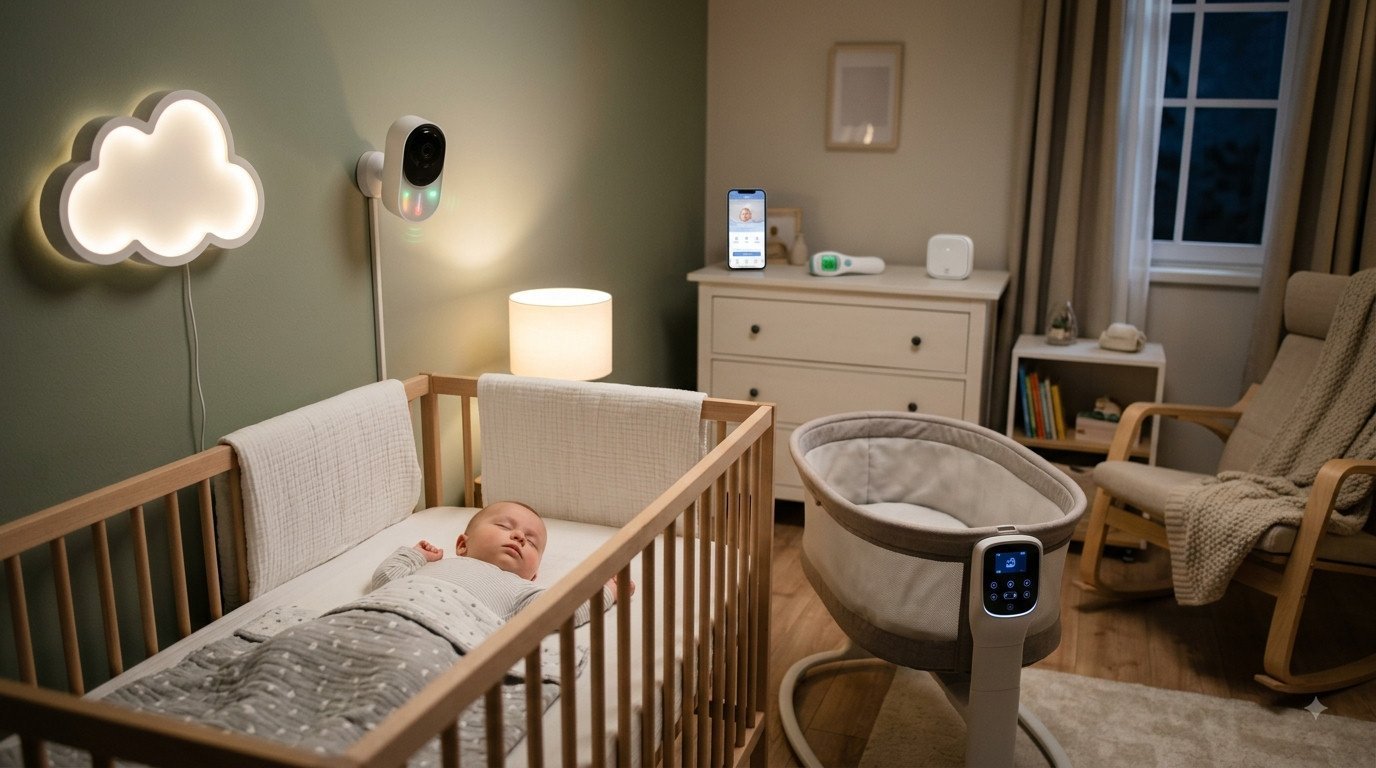
Smart baby technology (often called a "smart nursery") refers to connected devices and wearables built specifically for caring for, monitoring, and soothing infants. They use Wi-Fi, Bluetooth, sensors, and increasingly artificial intelligence (AI) to send data about a baby's sleep, health, or behavior to a parent's smartphone in real time.
While classic baby monitors just transmit audio and video, smart systems analyze data patterns, offer personalized sleep recommendations, or respond automatically to a baby's crying.
The Main Categories of Smart Baby Tech – and What Each One Actually Solves
Before settling on a single device, it helps to take a step back. Nearly the entire smart-baby market breaks down into four broad categories, and each one solves a different everyday problem – none of them replaces the others. Once you know which category a device belongs to, it's much easier to judge whether it actually fits your situation.
Monitors: Audio, Video, and Motion
The oldest and most common category is the baby monitor. Audio-only models transmit sound, video models add a live picture, and motion-sensing versions sound an alert if nothing has moved in the crib for a set stretch of time. The appeal is easy to understand: parents don't have to walk into the room every time to check on the baby, and can still react quickly if something changes. For most families, this is the single most useful category to start with. In my experience as someone who runs this site, I'd start here and nowhere else – it's the one category almost every family ends up using well past the newborn stage.
Wearables and Trackers
Sensors worn on the body – socks, clips, or patches – continuously measure things like heart rate or skin oxygen levels and chart them in an app. Here's the important part: consumer wearables like these are generally not medical devices, and they aren't approved to diagnose a condition or replace a doctor's exam. They add extra information, nothing more – and they're worth treating that way, however reassuring the numbers on the screen might look. Honestly, I'm not a fan of marketing that blurs this line, because it can nudge worried parents into treating a consumer gadget as more authoritative than it actually is.
Smart Cradles and Soothing Devices
These devices actively step in rather than just observe: they rock, play white noise, or respond automatically to crying. The value here has less to do with data and more to do with practical relief – a device that can take over for a minute at night while a parent is still waking up, or that buys a short nap during the day while something else gets done around the house.
App-Connected Feeding and Diaper Trackers
The least flashy but often underrated category: simple apps, or connected scales and bottles, that log when and how much a baby ate or drank and when the last diaper change happened. In the early weeks especially, when sleep deprivation scrambles everyone's memory, a basic log can offer a surprising amount of clarity – often with no sensors on the baby at all, just manual entries.
The point of sorting things this way is simple: not every baby, and not every family, needs a device from every category. Figuring out ahead of time which specific problem you're trying to solve – better sleep, more confidence when putting the baby down, a clearer sense of the daily rhythm – usually leads to buying more deliberately, and often buying less overall.
When Categories Blur Together
In practice, the lines between these four categories aren't always sharp. Some cameras now detect motion and breathing rate through image analysis alone, and some cradles can sync with an app to send feeding reminders. Hybrid devices like these can be genuinely useful when they solve a real problem that spans more than one category – but they rarely earn their price tag just because they "do more." What matters is whether the extra feature actually gets used regularly, or just gets tried once and forgotten.
The Most Popular Smart Gadgets for Everyday Baby Care
By now, the market offers a digital solution for nearly every aspect of infant care. The best-known product categories include:
1. AI Baby Monitors and Cameras
Modern baby cameras don't just stream HD video to your phone – they come with advanced motion and sleep analysis. Some models detect whether a baby's face is covered, whether they've rolled onto their stomach, or what the room temperature is.
Our Recommendation
Smart Baby Monitor with Camera
HD video streaming to your phone, motion and sleep analysis, room temperature and sleep-position detection.
What convinces me about this pick is the stable connection and straightforward setup – exactly the basic-category reliability I'd look for first before considering anything fancier.
2. Smart Socks and Vital-Sign Wearables
Specialized pulse-oximeter socks or clip-on sensors on a baby's clothing continuously measure heart rate and skin oxygen levels. If a reading falls outside the normal range, a base station or your smartphone sounds an immediate alert.
Our Recommendation
Smart Vital-Signs Sock
Continuous heart rate and oxygen level monitoring, alerts for out-of-range readings, real-time data sent straight to the app.
For us, this wasn't an abstract discussion: our daughter was born three months early, and in the hospital she had repeated heart-rate drops – we were told there that this happens in a lot of babies, it just usually goes unnoticed because no one's monitoring for it. That's exactly why we had one of these socks running at home once we were back, and I can honestly say it let us sleep noticeably calmer at night, knowing her heart rate and breathing were being tracked. For us that wasn't a gadget, it was real reassurance during a time we were genuinely scared. That said, it's worth being clear-eyed about this: a sock like this doesn't replace medical monitoring and isn't a diagnostic device – for us, the calm came from having extra information, not from any guarantee.
3. Automatic Cradle Swings and Smart Beds
Electric cradle swings simulate the gentle rocking motion babies remember from the womb. Smart versions use built-in microphones to detect when a baby gets restless and automatically switch on the rocking motion or soothing white noise.
Our Recommendation
Smart Automatic Cradle Swing
Gentle rocking motion that mimics the womb, microphone detection when the baby gets restless, automatic white noise for soothing.
Of everything in this article, this is the one gadget I'd actually call worth the price for a lot of families – the practical relief during those exhausting first weeks is the kind of benefit you notice immediately, not one you have to squint at a chart to see.
4. Smart Thermometers and Bottle Warmers
Stick-on patch thermometers continuously track body temperature during illness and send the trend straight to an app. Connected bottle warmers, meanwhile, let you warm breast milk or formula to exactly the right temperature via smartphone – right from your bed.
Our Recommendation
Smart Fever Thermometer
Stick-on patch thermometer, continuous temperature tracking, real-time trend data sent straight to the app.
I like this one for the narrow, specific job it does – tracking a fever trend overnight without waking the baby for a manual check – rather than as a general do-everything health monitor.
The Benefits: More Safety, or Just Peace of Mind?
For many new parents – especially with a first child – smart baby tech brings noticeable relief:
- Better sleep for parents: Knowing a sensor is tracking vital signs helps many moms and dads fall asleep more calmly and cuts down on constant visual checking.
- Spotting patterns: Sleep and feeding apps help parents understand a baby's rhythms faster and catch tiredness cues earlier.
- Everyday relief: Automatic cradle swings can buy parents a few precious minutes to breathe, eat, or get a chore done.
What's Actually Useful – and What's Just a Gimmick
Not every feature that sounds impressive in the marketing copy actually makes a difference day to day. A few patterns tend to repeat across many families' experiences, and they're worth keeping in mind when narrowing down a purchase. This is honestly the section I'd want every new parent to read before opening a single product page.
What tends to earn its keep
A reliable video monitor with a stable connection is, for most families, one of those purchases that genuinely pays off – simply because you can check on the baby without opening the door and risking waking them. Simple feeding or sleep logs also tend to get used for months on end by a lot of parents, precisely because they cost little and demand almost no tech overhead. And automatic cradle swings are frequently credited with real, tangible help during those first, especially exhausting weeks.
What tends to end up in a drawer
Features designed mainly to impress – highly detailed AI sleep-stage breakdowns for newborns whose sleep patterns are still changing almost daily, or companion apps stuffed with dozens of charts – often stop getting opened after just a few weeks. The more a device promises to do everything, the more worth asking, up front, exactly which concrete problem it's meant to solve, and whether that's actually a problem you have.
A simple rule of thumb
Before buying, an honest question helps: does this device solve a problem you actually have right now, or are you buying it because it looks innovative and other parents have one? Devices that address a specific everyday problem tend to still be in use by month three or four. Devices that mostly deliver a feeling of control or novelty tend to gather dust once the initial excitement wears off.
Common buying pitfalls
A frequent mistake is buying a device before birth for a baby you don't know yet – some babies sleep well from the start and need little help, while others are more restless and genuinely benefit from a cradle swing or closer monitoring. A second pitfall is running two devices with overlapping functions at once, like a camera monitor and a separate motion-sensor pad both trying to solve the same problem. Usually one is plenty in the end – the other just costs extra money, and extra worry, the moment the two disagree with each other.
The Downsides: Privacy, Radiation, and Over-Monitoring
Despite the many benefits, there are considerations worth weighing carefully before you buy – and I'd rather lay these out plainly than pretend smart baby tech is a purely positive story:
1. Data and IT Security
Smart devices collect highly sensitive data. Camera streams, audio data, and health profiles are often processed in cloud storage. Weak encryption or weak passwords can, in the worst case, let third parties gain access to the camera in your baby's room.
2. Electromagnetic Radiation
Devices worn directly on a baby's body (like socks or clips) or placed close to the crib emit Wi-Fi and radio signals continuously. Even when they meet regulatory limits, many parents try to keep electromagnetic exposure around their infant as low as possible. My own approach is simply to keep devices a reasonable distance from the crib where that's practical – a modest, low-effort habit rather than a reason to avoid these devices altogether.
3. A Fading Gut Instinct
The biggest risk of smart sensors is losing touch with parental instinct. When parents trust app data more than their own perception, it can create unnecessary anxiety. False alarms – say, because a sock slipped off – often trigger panic even though the baby is sleeping peacefully. This is the risk I'd weigh most heavily of the three, more than the data or radiation questions, because it changes how you actually experience the early months.
Privacy and Security in Practice: Protecting Your Network
The moment a camera or sensor in the nursery connects to the internet, a baby gadget also becomes an IoT device on your home network – with everything that responsibility involves. A handful of basic precautions cut the risk substantially, and none of them require an IT background.
Secure your home network
If I had to pick just one piece of advice from this whole section, it would be this one. The single most important, and easiest, step is a strong, unique Wi-Fi password – never the default password that shipped with the router or the device itself. Where possible, it's worth setting up a separate guest or IoT network for connected devices, so that if one gadget is ever compromised, it doesn't automatically open a door to laptops, smart TVs, or anything else on the home network.
Check the device settings
Many baby cameras let you restrict remote access, turn on two-factor authentication, or revoke old access permissions – handy if a device was bought secondhand. It's worth going through these settings once, carefully, during setup rather than just leaving the factory defaults in place. Just as important: install firmware updates promptly, since many known security vulnerabilities get patched exactly that way.
Know where the data actually goes
Some devices process video and audio entirely on the device itself; others upload it to the cloud by default in order to offer features like remote access from outside the home or a stored history. Reading the manufacturer's privacy policy will tell you where the data lives, how long it's kept, whether it's shared with third parties, and whether it can be fully deleted. Anyone uncomfortable with that can look specifically for models that store data locally or don't require a mandatory cloud connection.
None of this makes a device completely risk-free – but taken together, these steps meaningfully lower the odds of something going wrong, and most of them take only a few minutes to set up.
Camera placement matters more than you'd think
Physical placement matters too: a camera that happens to also frame a window, an entryway, or other sensitive parts of a room reveals more than it needs to if it's ever accessed by the wrong person. It's worth deliberately narrowing the frame to just the crib. And anyone who shares clips or screenshots in family group chats or on social media is worth a second glance at what's actually visible in the background.
The microphone deserves the same thought: many monitors pick up more than just the baby's sounds – they capture conversations happening in the room too. Sensitive conversations are better held out of the microphone's range, and anyone sharing app access with extended family is worth pausing to consider who, in theory, could be listening in.
Budget Tiers: What Basic vs. Premium Setups Actually Get You
Smart baby tech spans practically every price point, from under fifty dollars for a basic monitor to several hundred for a full connected setup. Price alone, though, says surprisingly little about whether a device will actually fit your day-to-day life.
The basic setup
My own view here is that most families overspend on this category before they even know what they need. A simple audio or video monitor with no extra bells and whistles covers the core need for most families: hearing or seeing what's happening in the nursery without opening the door. Paired with a stable, low-radiation signal and a manually kept note or app for feeding and diaper changes, this covers a very large share of daily life – for a fraction of the cost of a fully connected setup.
The mid-range
This is where extra features start showing up: motion detection, room temperature readouts, basic sleep summaries, or an automatic cradle swing. For families who will genuinely use these features regularly – say, because a baby sleeps restlessly, or because multiple caregivers need to coordinate through a shared app – the extra investment can be worth it.
Premium setups
At the top end are fully connected systems that link multiple devices – camera, wearable, smart cradle, feeding app – through one shared platform. The appeal is convenience: everything in one place, one ecosystem instead of several separate apps. The cost of that isn't only financial; it also shows up as more dependence on a single manufacturer and more personal data flowing through one point. This is the tier I'd personally be most cautious about, not because any single device is bad, but because bundling everything under one account raises the stakes if that account is ever compromised.
A sound approach is to start with the essentials and upgrade deliberately once a real, recurring need shows up – rather than buying the entire ecosystem at once in the excitement of getting ready for a new baby.
Buying secondhand
Monitors and cradle swings in particular get passed along secondhand fairly often, which can be a good deal. For connected devices, it's worth checking two extra things: can the device be fully reset to factory settings, wiping old accounts and access permissions? And is the manufacturer still shipping firmware updates for that model? An older, no-longer-supported device can end up being the riskier choice despite the lower price.
Tech Is Not a Substitute for Bonding: What Not to Rely On It For
However helpful individual devices can be day to day, there are areas where technology simply should not stand in for parents or for medical expertise.
Safe-sleep basics always apply
Regardless of what a sensor or an app happens to show, the widely recognized basics of safe infant sleep still stand: back to sleep, a bare crib with no loose blankets, pillows, or stuffed animals, and an appropriate room temperature. No wearable and no camera alert replaces these basics – they're an addition, not a substitute, and they should be followed no matter what the app is or isn't reporting at any given moment.
Wearables are not medical devices
Consumer trackers designed for home use generally don't go through the same approval process as medical monitoring equipment used in a hospital. They can offer extra information, but they can't diagnose a condition or reliably rule one out. For genuine health concerns – fever, breathing trouble, unusual behavior – a pediatrician remains the right call, regardless of what a device last displayed or how reassuring the latest chart looked.
Physical closeness can't be digitized
What I find most convincing about this whole conversation is this simple point, so it's worth stating plainly. A video monitor shows that a baby is asleep. It doesn't show what it feels like to be held, rocked, or picked up. Bonding comes from closeness, eye contact, and responding in real time – things no screen can replace. Technology can create space for more of those moments to happen; it shouldn't try to stand in for the moments themselves.
For grandparents and sitters too: inform, don't replace
When a baby is staying with grandparents or a caregiver, an app can genuinely help by sharing information from a distance. But it doesn't replace the conversation that should happen beforehand – where the baby sleeps, what to watch for, what to do in an emergency. That planning matters whether or not a device is in the room; a device is one more set of eyes, not a caregiver.
Setting Healthy Boundaries: When the App Creates More Stress Than It Relieves
Oddly enough, some parents report feeling more anxious, not less, after bringing home a monitoring device. That's rarely about the device itself – it's usually about how it gets used. I'd argue this section matters just as much as the buying advice, since a great gadget used the wrong way can leave you worse off than no gadget at all.
The every-five-minutes habit
Checking the vitals app every few minutes ends up costing more screen time than it buys in peace of mind. A useful gut check: is the device helping you check on the baby less often and sleep more easily – or has it become one more reason to stay awake and keep watching? If it's the second one, a deliberate cutback helps, like setting specific check-in times instead of monitoring around the clock.
Handling false alarms
Sensors worn on the body shift out of place. Cameras briefly lose the picture when a baby rolls under a blanket or the light changes. That inevitably produces occasional false alarms that have nothing to do with the baby's actual condition. It helps to expect this ahead of time, so an alert triggers a calm check rather than immediate panic.
Giving yourself permission to turn it off
Not every night, nap, or car ride needs a digital companion. On days when your own stress is already running high, it can be a relief to lean on plain presence instead – keeping an eye on the baby without an app in between. In the end, the technology should ease your mind, not give it one more thing to manage.
Coordinating with your care team
When more than one person cares for the same baby – a partner, grandparents, a childminder – it's worth briefly agreeing on who's actually watching the app and who's trusting that person to speak up. Without that agreement, several people often end up anxiously checking the same screen in parallel, instead of one person calmly owning it while everyone else genuinely gets to switch off.
Frequently Asked Questions
Is a smart baby monitor medically necessary?
No. A smart baby monitor is a comfort and convenience product, not a medical monitoring device. It can make everyday life easier, but it doesn't replace medical checkups or the established guidelines for safe infant sleep.
Can a vital-signs wearable prevent SIDS?
Consumer wearables are generally not approved medical devices and aren't sold with that kind of promise. They can offer extra information, but they should never be treated as a substitute for the established safe-sleep recommendations.
How many smart gadgets do you actually need for the first year?
There's no fixed number. Many families do perfectly well with just one reliable monitor; others also find real value in an automatic cradle swing or a feeding app. The more useful approach is buying to solve a specific problem you actually have, rather than working through a complete gear checklist.
How secure are connected baby cameras against outside access?
A strong, unique Wi-Fi password, security features like two-factor authentication turned on, and prompt firmware updates meaningfully lower the risk. No connected device is ever completely risk-free, but these basic steps make a real difference.
Is a full premium setup worth it for a first-time purchase?
Not necessarily. A simple video or audio monitor is usually plenty for the first few weeks. A premium ecosystem tends to make more sense once a specific, recurring need shows up that a single device can't cover.
What should you do if the monitoring app creates more stress than reassurance?
That's a common sign it's time to rethink how the app is being used. Setting fixed check-in times instead of watching constantly, building in deliberate tech-free stretches, and remembering that occasional false alarms are normal all help many parents feel more at ease with the device again.
Does smart baby tech emit harmful radiation?
Devices sold on the market are required to meet applicable limits for electromagnetic exposure. Parents who still want to minimize exposure can look for low-radiation transmission modes or simply place devices a bit further from the crib.
Is it fine to keep using a secondhand smart monitor?
Usually, yes, as long as the device can be fully reset and the manufacturer is still shipping security updates for it. Old accounts, linked apps, and stored access permissions should always be removed before you start using it yourself.
Bottom Line: How Much High-Tech Does a Baby Really Need?
Smart baby technology can significantly ease the first year with a baby, giving parents valuable freedom and a sense of security. But it should be seen as a complement, not a replacement, for parental care and your own gut feeling.
Before buying, it's worth checking which devices genuinely add value and where a simple, low-radiation audio baby monitor is entirely enough. In the end, what matters isn't the amount of data on your phone – it's a calm, relaxed environment for parents and child. If I had to sum up my own stance after covering this topic, it's that I'd rather own one reliable device I trust than a whole shelf of gadgets I keep second-guessing.
*Affiliate link. Prices and availability may vary, please check current details with the retailer.
Save on Pinterest →
Comments